Accounting Software for Firms: Every Client's Books in One Login
Each client gets its own complete books — ledgers, invoices, purchases, bank and GST reports. You and your staff switch between clients from the top bar, and one dashboard shows whose books need attention.
- Separate books per client
- Import from Tally, Busy, Marg
- Staff see only their clients

What is accounting software for firms?
Accounting Firm by ERP Group is cloud accounting software for bookkeeping firms, CA firms and accountants who keep the books of many businesses. The firm has one login; every client is a separate company with its own complete books, and the firm's staff work in the clients given to them.
It is the full ERP Group accounting software for each client, plus a firm layer on top: the client list, staff, and a dashboard of where every client's books stand.

One firm, many companies, one login.
- Who it's for
- Bookkeeping firms, CA firms, accountants and outsourced accounting teams keeping 5 to 75+ clients' books
- Each client's books
- Ledgers, journals, sales and purchase invoices, bank, products and services, fixed assets, audit trail
- Reports
- Profit & loss, balance sheet, trial balance, ledgers and GST reports for every client
- Switching
- Pick a client from the top bar; "Firm" takes you back to the firm dashboard
- Staff
- A login per staff member with only the clients you tick; switch a login off any time
- Old data
- Import from Tally, Busy, Marg or Excel; add your client list from Excel in one go
- Firm dashboard
- Last entry, bank lines not entered, overdue invoices and the next GST return per client
- Separation
- Clients' books never mix with each other or with the firm's own books
- Related
- Only filing GST for clients? See GST Practice. Free tools: balance sheet generator, TDS calculator, GST calendar
How the firm and its clients fit together
- Firm
- Your own company in ERP Group, with its own books, the client list, staff and the firm dashboard.
- Client company
- A separate company for each business you keep books for, with its own ledgers, invoices, bank and reports.
- Staff
- People in your firm. Each one signs in and works only in the client companies you give them.
- Handled by
- The staff member looking after a client, shown on the client list and the dashboard.
Is this how your firm keeps clients' books today?
A Tally data folder per client on office PCs, a separate login per client in online software, and no way to see who is behind.
A login per client
Fifty clients, fifty passwords — and every staff member needs all of them.
Data stuck on office PCs
Client data on one computer, copied by pen drive, and nothing when a staff member works from home.
Whose books are behind?
You find out a client's books are three weeks behind when the GST return is due.
How does a firm start with Accounting Firm?
Set up the firm once, then work client by client.
-
1From Excel
Add your clients
One by one or the whole list from Excel. Each client gets its own books, ready for entries.
-
2Tally / Busy / Marg
Bring in old books
Move each client's ledgers and opening balances over from their old software or a spreadsheet.
-
3Per staff member
Give clients to staff
Each staff member gets a login and only the clients you tick for them.
-
4Every day
Switch client and work
Pick a client from the top bar and keep its books. Back on the firm dashboard, see who needs attention.
What it looks like inside
Screenshots from the demo firm.
All client companies in one list
Name, GSTIN, monthly or quarterly GST, contact and who handles each client. The client switcher sits in the top bar on every screen.
- Add one client or import the list from Excel
- Group clients by trade: traders, doctors, manufacturers
- Registered and unregistered businesses

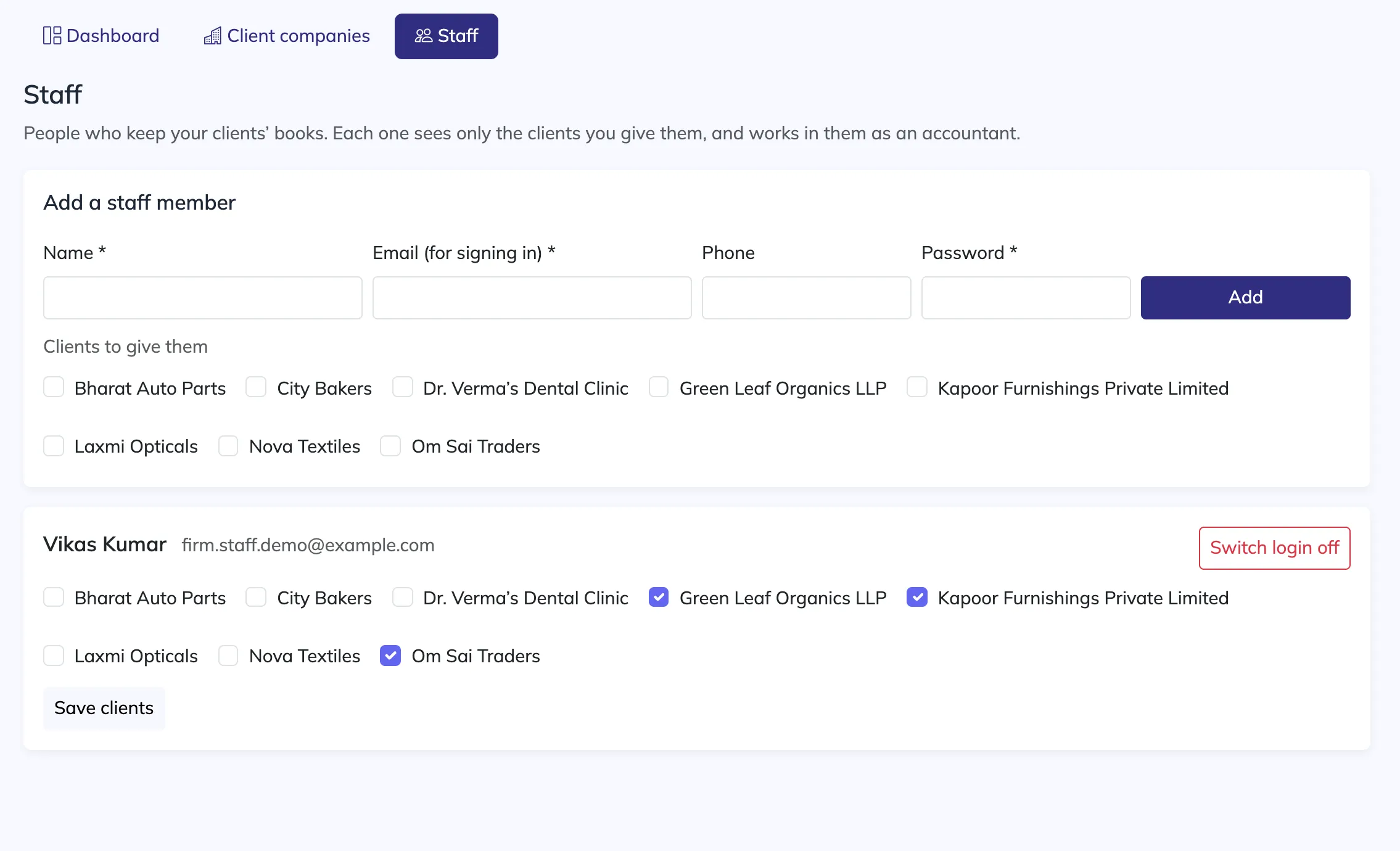
Each staff member sees only their clients
Add a staff login and tick the clients they look after. They work in those clients as an accountant and never see the rest.
- Change a staff member's clients any time
- Switch a login off the day someone leaves
- The firm owner sees every client
How do you see which client's books are behind?
The firm dashboard lists every client with the signs that something needs doing, so you follow up before the GST date.
No recent entries
Clients with nothing entered in the last 15 days.
Bank lines left
Bank statement lines not yet entered in the books.
Next GST return
The next return and its due date for each registered client.
Month's figures
Sales, purchases and overdue invoices of each client this month.
Which businesses can a firm keep books for?
Any Indian business — each client company has the full accounting, GST and reports it needs.

Traders & retailers
Sales and purchase invoices, stock items, GST.

Manufacturers
Purchases, fixed assets, depreciation, reverse charge.

Doctors & pharmacies
Clinics, chemists and unregistered professionals.

Restaurants & services
Daily sales, expenses, bank and TDS.
Accounting Firm vs Tally on office PCs vs a login per client
What changes for a firm keeping many clients' books.
| For many clients | Accounting Firm | Tally on office PCs | A login per client |
|---|---|---|---|
| One login for all clients | Yes | Per PC | No |
| Work from any browser | Yes | Remote access add-on | Yes |
| Staff see only their own clients | Yes | No | Share passwords |
| One dashboard of every client's books | Yes | No | No |
| Import from Tally, Busy, Marg | Yes | — | Varies |
| One bill for the whole firm | Yes | Licence per PC | Bill per client |
How much does Accounting Firm cost?
Priced per firm, not per client — the more clients you keep, the less each one costs.
Firm Starter
Small bookkeeper or new CA office
₹1,999 / month
+ GST · about ₹200 per client a month
- Full books for every client company
- Firm dashboard and client switcher
- Import from Excel, Tally, Busy, Marg
- GST Practice not included
- Extra client ₹199 a month
Firm Growth
Established CA or accounting office
₹4,499 / month
+ GST · about ₹150 per client a month
- Full books for every client company
- Firm dashboard and client switcher
- Import from Excel, Tally, Busy, Marg
- GST Practice included — up to 50 GST-only clients
- Extra client ₹149 a month
Firm Pro
Large firm or back office
₹8,999 / month
+ GST · about ₹120 per client a month
- Full books for every client company
- Firm dashboard and client switcher
- Import from Excel, Tally, Busy, Marg
- GST Practice included — up to 150 GST-only clients
- Extra client ₹99 a month
Firm Starter
Small bookkeeper or new CA office
₹19,990 / year 2 months free
+ GST · ₹1,665 a month, billed yearly
- Full books for every client company
- Firm dashboard and client switcher
- Import from Excel, Tally, Busy, Marg
- GST Practice not included
- Extra client ₹199 a month
Firm Growth
Established CA or accounting office
₹44,990 / year 2 months free
+ GST · ₹3,749 a month, billed yearly
- Full books for every client company
- Firm dashboard and client switcher
- Import from Excel, Tally, Busy, Marg
- GST Practice included — up to 50 GST-only clients
- Extra client ₹149 a month
Firm Pro
Large firm or back office
₹89,990 / year 2 months free
+ GST · ₹7,499 a month, billed yearly
- Full books for every client company
- Firm dashboard and client switcher
- Import from Excel, Tally, Busy, Marg
- GST Practice included — up to 150 GST-only clients
- Extra client ₹99 a month
 Free 30-minute demo
See a demo firm with its clients. Then set up yours.
What happens in your 30 minutes- 0–10min
Your firm today How many clients, the software they are on now and your team.
- 10–20min
A day in the firm Switching clients, entries, bank, reports and the firm dashboard.
- 20–30min
Moving over & price How your clients' data comes across and the plan for your number of clients.
Get a Free Accounting Firm Demo
Tell us how many clients you keep books for. No spam.
Chat on WhatsApp Instead