Travel Agency Software enquiries, packages and departures
Travel agencies and tour operators — enquiries and follow-ups, packages with itineraries and prices, fixed departures with seats, bookings and payments, and an AI itinerary helper in one system, with GST and your books built in.

Everything about a trip on one screen
The enquiry, the package and itinerary, the departure and seats, travellers, payments and the GST invoice — so sales, operations and accounts work from the same trip.
- Enquiries with follow-up dates and quotes
- Packages with day-wise itineraries and prices
- Fixed departures with seats sold and left
What is software for travel agencies and tour operators?
Travel Agency Software runs the sales and operations of a travel agency or tour operator in one system: enquiries with follow-ups, packages with day-wise itineraries and prices, destinations, fixed departures with seats, bookings, payments and GST invoices, and an AI helper that drafts itineraries — with the accounts on the same records.
ERP Group's travel screens follow a trip from enquiry to return: quotes from your packages, departures with seats sold and left, payments against the booking, and insights on enquiries and conversions.
Last updated: October 2026 · features as they work in ERP Group today
Key facts
| Built for | Travel agencies, tour operators, pilgrimage and school-trip organisers |
|---|---|
| Sales | Enquiries, follow-ups, quotes and bookings |
| Products | Packages, itineraries, destinations and departures |
| Operations | Seats, travellers and payments |
| Accounts | GST invoices and books |
What ERP Group does for a travel agency
Enquiries, packages, departures and bookings on one set of screens — for one office or several branches.
Enquiries
- Enquiries from website, ads and walk-ins
- Travellers, dates and budget
- Follow-up dates
- Quotes on WhatsApp and e-mail
Packages
- Day-wise itineraries
- Hotels, meals and transfers
- Prices per person
- Shown on your website
Departures
- Fixed departures with dates
- Seats sold and left
- Price per departure
- Group bookings
Destinations
- Destinations with highlights
- Packages per destination
- Seasons and best time to visit
- Photos for your website
Travel AI
- Draft an itinerary from a few lines
- Edit and save as a package
- Answers about your packages
- Saves hours per quote
Insights and accounts
- Enquiries, bookings and conversion
- Bookings by destination
- GST invoices and payments
- Books in the same login
What do the travel screens look like?
Real screens from an ERP Group demo tour operator — the names and figures are demo data.
 View larger
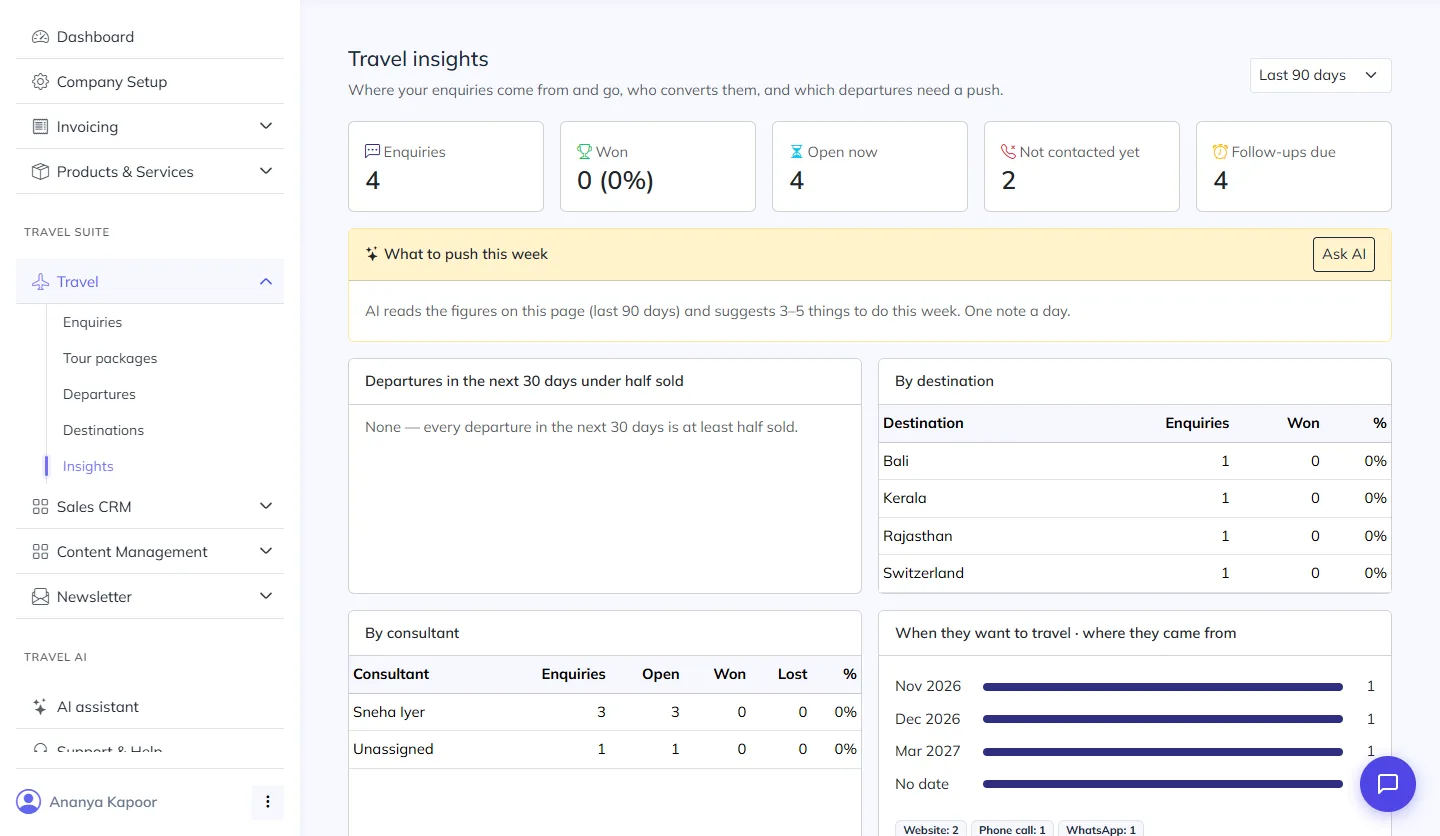
Travel insights
Enquiries, bookings and conversion for the period — by destination and by source.
- Conversion rate
- Bookings by destination
- Enquiries by source
 View larger
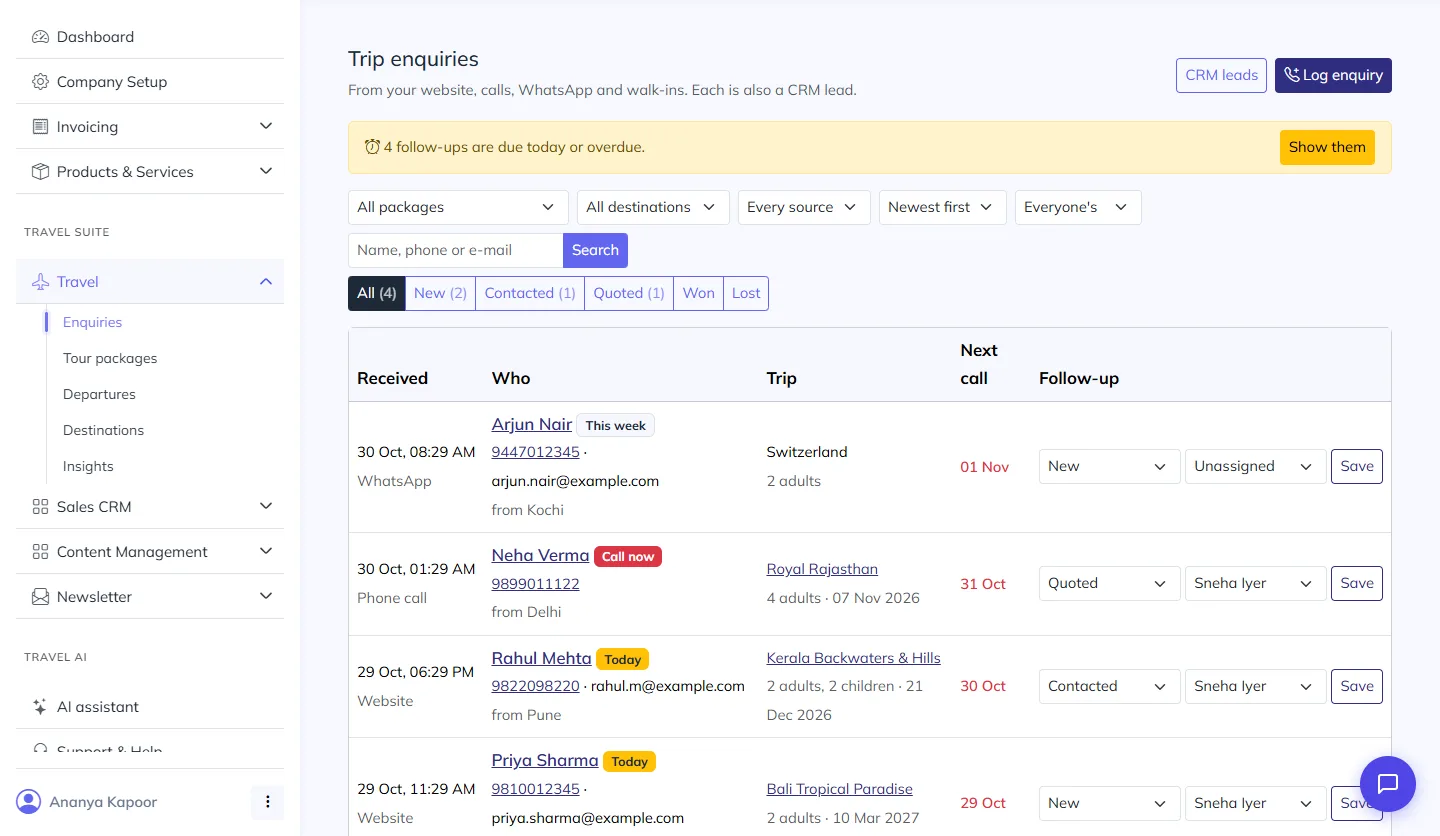
Enquiries
Every enquiry with travellers, destination, dates, status and the next follow-up.
- Follow-up dates
- Quoted, booked or lost
- Assigned to a salesperson
 View larger
Packages
Every package with its destination, duration, price and status — open one for the day-wise itinerary.
- Duration and price
- Day-wise itinerary
- Published to the website
 View larger
Departures
Fixed departures with their dates, package, price and seats — sold, left and full.
- Seats left
- Price per departure
- Bookings per departure
 View larger
Destinations
Your destinations with their region, packages and highlights.
- Packages per destination
- Highlights
- For your website
 View larger
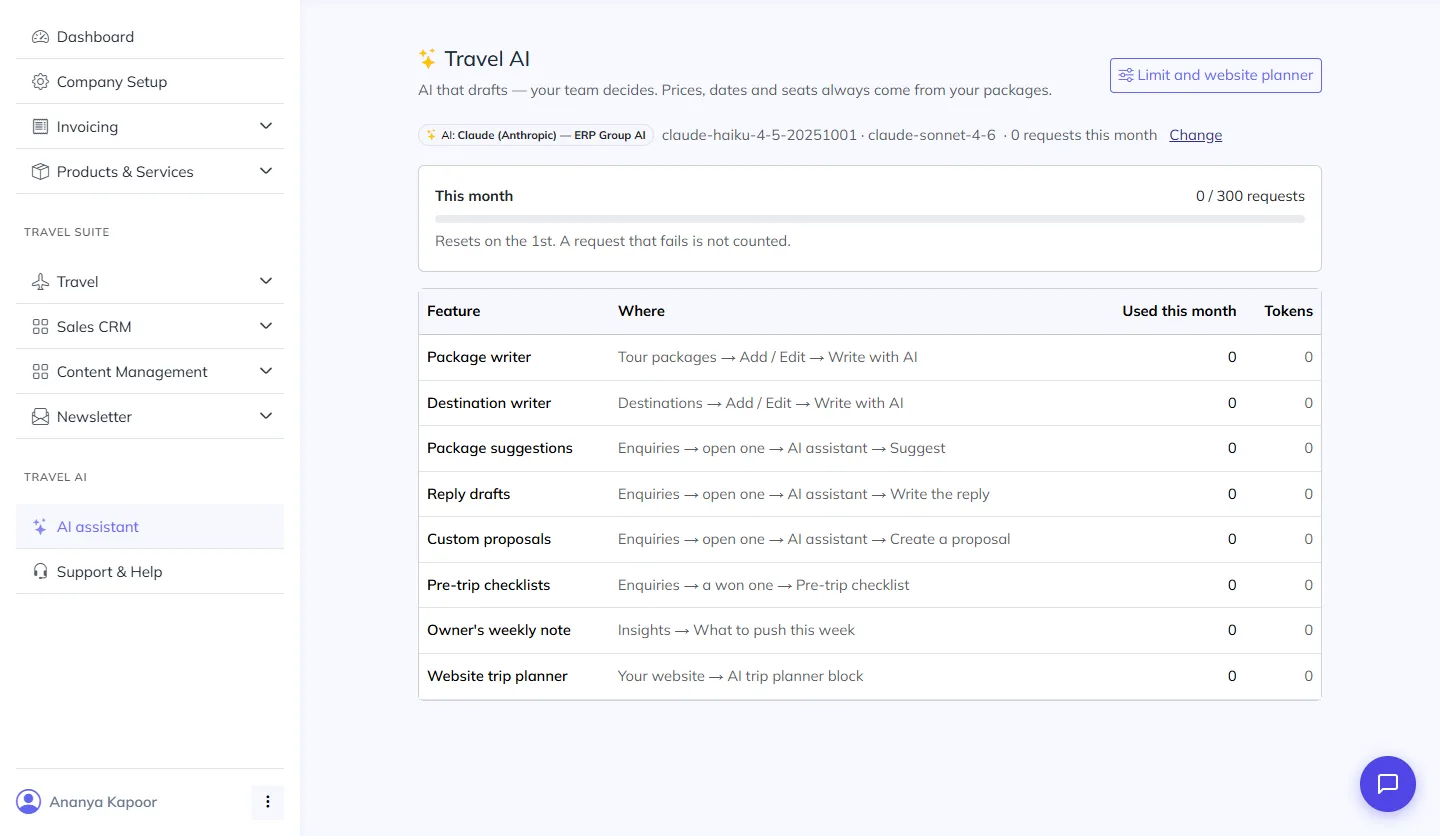
Travel AI
Ask for an itinerary in a few words and get a day-wise draft you can edit and save as a package.
- Day-wise drafts
- Edit before saving
- Saved as a package
From enquiry to the trip home, nothing missed
Each trip moves through the same steps, so sales, operations and accounts always know what is done and what is pending.
How is ERP Group different from Excel & WhatsApp, or A travel CRM + Tally?
Many agencies run on Excel and WhatsApp, or on a travel CRM with the accounts kept separately. Here is what changes when it is one system.
| What you need | Excel & WhatsAppThe usual start | A travel CRM + TallyTwo systems | ERP GroupOne system |
|---|---|---|---|
| Enquiries with follow-up dates | Chats and notebooks | Yes | Yes, with quotes |
| Packages with day-wise itineraries | Word files | Usually | Yes, shown on your website |
| Fixed departures with seats | A sheet | Varies | Yes, sold and left |
| AI itinerary drafts | Not available | Varies | Yes, Travel AI |
| Payments and GST invoices | In Tally | In Tally | Yes, from the booking |
| GST invoices, e-invoice and e-way bill | Typed again in Tally | Entered again in Tally | From the same records |
| Books, GST data and bank reconciliation | Separate software | In Tally, kept in step by hand | Built in — or export to Busy / Tally |
| Several branches in one account | One file per branch | Varies | Yes, owner sees every branch |
| Payroll, CRM, WhatsApp and the rest | More software | More software | Same login, add when needed |
"Varies" and "usually": other software differs — ask your vendor. ERP Group columns are what the software does today.
See it on a demoThe modules a travel agency runs on
These screens share their customers, bills and staff with the rest of ERP Group.
Accounting & GST
Collections, expenses, ledgers, GST data and bank reconciliation.
Accounting softwareHow does a travel agency start on ERP Group?
More for travel and hospitality
See your agency on ERP Group
Tell us where you sell and whether you run fixed departures. We'll show you an enquiry to booking with a package, departure seats and Travel AI on a demo agency.